
Introduction
Read more: https://www.qt.io/product/ui-design-tools
Qt Design Studio
Define the look and feel of the UI from wireframe to final implementation with preset UI components. Import UI design files from 2D and 3D tools to Qt Design Studio, which can turn them into code for developers. Qt Design Studio prototyping features bring your designs to life and simulate and validate interactions and dynamic behaviour. You can test, preview, and fine-tune your designs to pixel-perfection live on the desktop or target device.
Qt Designer
Qt Designer is the Qt tool for designing and building graphical user interfaces (GUIs) with Qt Widgets. You can compose and customize your windows or dialogues in a what-you-see-is-what-you-get (WYSIWYG) manner, and test them using different styles and resolutions.
Widgets and forms created with Qt Designer integrate seamlessly with programmed code, using Qt’s signals and slots mechanism, so that you can easily assign behaviour to graphical elements. All properties set in Qt Designer can be changed dynamically within the code. Furthermore, features like widget promotion and custom plug-ins allow you to use your own components with Qt Designer.
Note: You have the option of using Qt Quick for user interface design rather than widgets. It is a much easier way to write many kinds of applications. It enables a completely customizable appearance, touch-reactive elements, and smooth animated transitions, backed up by the power of OpenGL graphics acceleration.
If you are new to Qt Designer, you can take a look at the Getting To Know Qt Designer document. For a quick tutorial on how to use Qt Designer, refer to A Quick Start to Qt Designer.
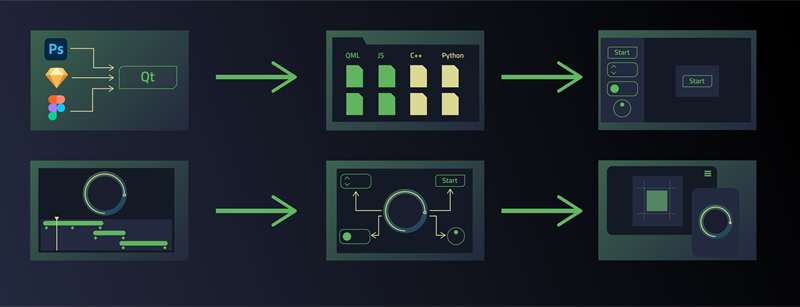
Typically, you as a designer would design a UI using imaging and design tools, such as Adobe Photoshop, Sketch, Blender, or Maya, and then send your design to a developer for implementation. With the Qt Bridge export tool, you can convert 2D assets into Qt Quick files. You can use the export functionality of 3D graphics tools to save your 3D assets in a format supported by Qt Design Studio. You can import the 2D and 3D assets into Qt Design Studio for editing, before you submit the UI to the developer for adding the functionality to the application.
The workflow consists of the following steps:
- Export your design from a design tool.
- Create a project in Qt Design Studio and import your design to it.
- Create reusable components in the Design mode.
- Animate your design with the transition editor or timeline and easing curve editor.
- Create interactions using states and connections.
- Preview your design in real time, on the desktop or on a mobile or an embedded device.
Qt Quick Designer
A tool for designing and building graphical user interfaces (GUIs) using Qt Quick. Integrated into Qt Creator.
Qt Creator is a cross-platform C++, JavaScript and QML integrated development environment which simplifies GUI application development. It is part of the SDK for the Qt GUI application development framework and uses the Qt API, which encapsulates host OS GUI function calls.[3] It includes a visual debugger and an integrated WYSIWYG GUI layout and forms designer. The editor has features such as syntax highlighting and autocompletion. Qt Creator uses the C++ compiler from the GNU Compiler Collection on Linux. On Windows it can use MinGW or MSVC with the default install and can also use Microsoft Console Debugger when compiled from source code. Clang is also supported. (1)
Qt Shader Tools
In order to allow shader code to be written once in Qt applications and libraries, all shaders are expected to be written in a single language which is then compiled into SPIR-V. This shanding language is Vulkan-compatible GLSL at the moment. This is different from the OpenGL-style GLSL Qt 5.x expects. See the GL_KHR_vulkan_glsl specification for an overview of the differences.
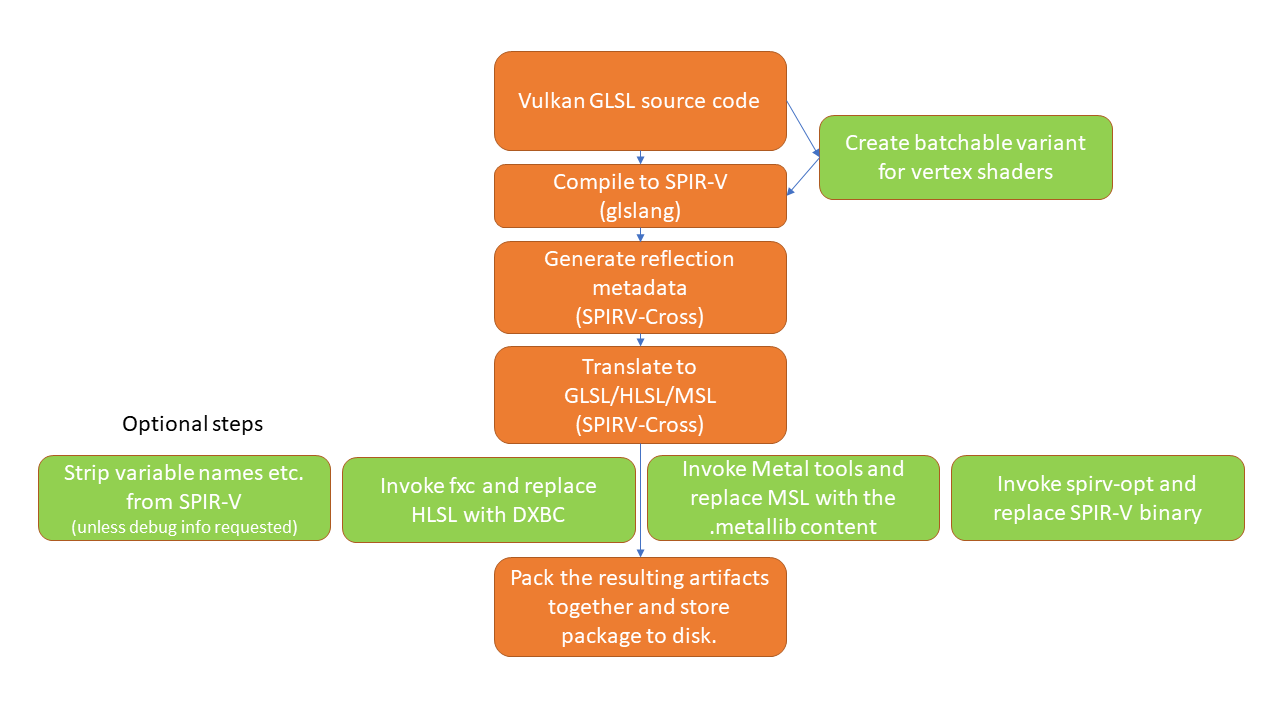
Source code for other shading languages, such as, GLSL, HLSL and the Metal Shading Language, are then generated from translating the SPIR-V bytecode, together with reflection information (inputs, outputs, shader resources). For GLSL in particular, this also involves generating multiple variants, meaning source code suitable for different GLSL versions, such as, GLSL ES 100, GLSL ES 300, GLSL 120, 150, etc. This is then all packed into serializable QShader container objects, typically stored in disk in form of files an extension of .qsb. The Qt Rendering Hardware Interface consumes QShader instances directly, picking the shader source or bytecode that is best suited for the graphics API used at run time. A QShader object is typically deserialized from .qsb files shipped with the application or Qt itself in the Qt Resource System.
Some platforms provide the option of compiling shader source code to an intermediate format similar to SPIR-V. This involves running platform-specific tools. With Direct 3D, the qsb tool provides the option to invoke the fxc tool from the Windows SDK once the HLSL source code has been generated. It then replaces the HLSL source code with the DXBC binary generated by fxc. This can have a positive effect on applications’ run time performance since they no longer need to do the first phase of compilation (HLSL source to DXBC) themselves. For macOS and iOS the XCode SDK provides similar tools. The downside of this approach that running these tools is only possible on their respective platforms. Therefore, this is best suited for use in combination with qsb’s CMake integration since doing shader conditioning at application build time implicitly comes with the knowledge needed about the target platform and what platform-specific tools can be invoked.
The following diagram describes the steps that happen during an invocation of the qsb tool. It is a command-line tool provided by the Qt Shader Tools. It integrates third-party libraries such as glslang and SPIRV-Cross, optionally invokes external tools, such as, fxc or spirv-opt, and generates .qsb files. Additionally, it can be used to inspect the contents of a .qsb package.
Bridging the gap between designers and developers.
In the video, you can see the design studio in action.
The source of the content: https://www.qt.io/product/framework
 Русский
  English
  Suomi
Suomi  简体中文
简体中文  Svenska
  فارسی
فارسی